

Every Sunday I pick one paper or release that's worth your time, break it apart, and tell you why it matters. No hype. No summaries of summaries. Just the idea, explained.

If your Mac updated to macOS 27 this fall, a language model came with it. You didn't ask for it. Apple downloads it automatically the next time you're online, and this year there's no switch to say no. MacRumors found a little over 20GB of storage handed to Apple Intelligence on one Mac mini, and a reader reported 30GB on theirs. So whatever else is true, you're already paying the rent on its desk.
Most people I talk to have no idea they can use it directly. You've had ChatGPT or Claude open in a tab all year. This one sits inside the operating system. Type fm in Terminal, accept a license once, and it answers offline, for free, without a word leaving the machine. If your company has moved its Macs to macOS 27, they have one too.
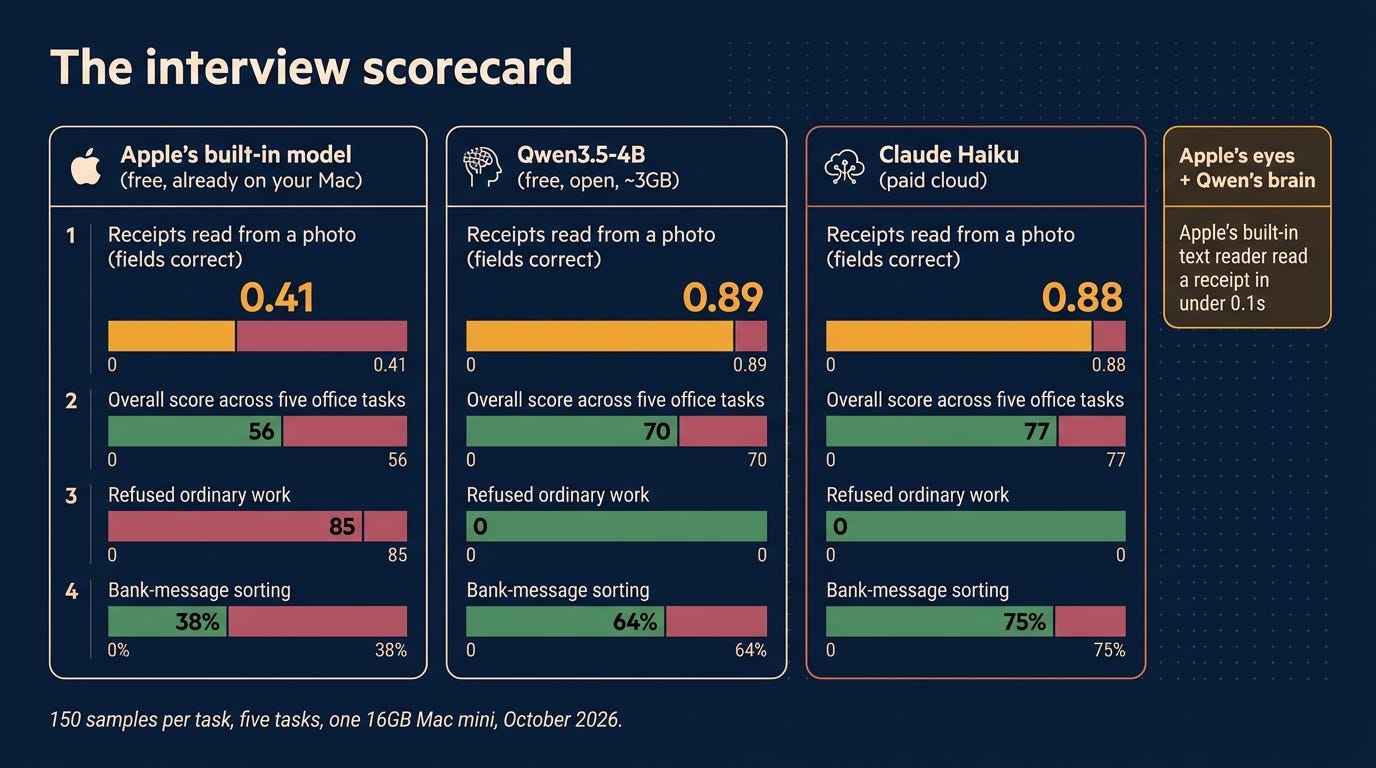
Here's what I found. Across five kinds of ordinary office work, Apple's built-in model scored 56 out of 100. A free open model called Qwen3.5-4B scored 70 on the same Mac. Claude Haiku, a paid cloud model, scored 77. On reading receipts from a photo, the free open model beat Apple's by more than two to one and matched the paid one.
So I did what you'd do with any new hire who shows up without being asked for. I interviewed it.
The junior from June
Back in June I wrote that Apple rented its brain. Apple reportedly used Google's Gemini as a senior expert, had it teach a much smaller model, then shipped the small one and sent the senior home. I called the small one the junior. This is the junior.
Apple is clear about what it hired the junior for. Summaries, tagging, pulling fields out of text, sorting things into categories. Not trivia, not math, not long reasoning. So that's what I tested.
I didn't ask it to write code or explain quantum physics. I asked it to do the paperwork.
It also has a short attention span. Apple documents the context window at about 4,000 tokens, roughly six pages. Mine held a little over 8,000, and other people have measured different numbers on different Macs. Either way, the 40-page contract isn't going in.
I'd love to tell you exactly which junior I interviewed, but Apple doesn't say. Its third-generation models come in two on-device sizes, and MacRumors reports that newer Macs with 12GB or more of memory get the larger one. My M4 mini qualifies, so the candidate may have been the bigger sibling. Apple declined to comment, in the sense that it never says.
The interview panel
Apple's junior. Free, already in the building, zero setup.
Qwen3.5-4B. An open model from Alibaba's Qwen team. Free to download, licensed for commercial use, about 3GB, and it reads images as well as text.
Claude Haiku. The outside consultant, paid by the job. It's there to set the bar, not to get hired.
Three other small open models also sat the interview. None of them could read a photo of a receipt, which was the job I cared about most, so they get this one sentence.
Everyone ran on the same 16GB Mac mini in my house, and each candidate did 150 of each of these: expense receipts from a photo, pulling names and companies out of news sentences, sorting bank customer messages into 77 categories, one-line news summaries scored blind, and following fussy instructions like "exactly three bullets, no commas."
Before anyone walked in, I wrote down the hiring rule. A challenger had to beat Apple's junior by at least 5 points, return clean structured answers at least 95% of the time, and not sit on more than 2GB of memory while idle. Otherwise Apple keeps the job on convenience. I write the rule first because I've watched benchmark numbers fall apart on a real machine, and it's easier to play fair before you have a favorite.
I picked office work, which is a bias. It's what Apple says the junior is for, and it's where small models show their gaps most.
How the junior did
The wins first, because there are wins.
The junior is quicker than both Qwen and Haiku, answering in under a second. On fussy instructions it scored 0.75, level with the paid consultant, complying like a nervous intern on day one. On one-line summaries it landed within a fraction of a point of Qwen. That's the job Apple advertises, and the junior can do it.
Then I handed it the receipts.
Reading straight from the photo, it got about 4 in 10 fields right. Qwen got 9 in 10. The misses weren't the interesting part. What it put in the gaps was. On four of the 150 receipts, it filled in the address as 123 Main St, Springfield, IL 62701. On six, the total came back as a closing parenthesis.
It didn't leave the field blank. It wrote the most generic address in America, in perfectly formatted output that any system would have accepted without blinking.
The names task went worse in a different way. Of 150 plain newswire sentences, the junior refused 54 as unsafe. One it wouldn't touch: "Australia went on to win the match at the Sydney Cricket Ground by 124 runs to take a two-nil lead in the five-test series after Lara failed in both innings." Cricket, apparently, is where Apple draws the line. Across every task it refused 85 times. The other candidates refused zero.
Bank messages: 38% right, against Qwen's 64% and Haiku's 75%. Average it all, even giving the junior its best receipt score, and it lands at 56. A pleasant, fast, impeccably polite 56.
The contractor who matched the consultant
Qwen3.5-4B read the receipts at 0.89. The paid consultant read them at 0.88. A free model on a Mac mini in my house, with no internet involved, matched a paid cloud model at the exact job most people would want a private model for. That's awesome, and it's why I ended up breaking my own rule.
Overall it scored 70 to the junior's 56, with Haiku at 77. It refused nothing and returned every answer in the structure I asked for. The part I like most is how boring it was. No refusals, no Springfield. It just did the paperwork.
Two limits belong next to those numbers. With 150 samples per task on one Mac, a few points on any single task is noise; the 48-point receipt gap isn't. And when Apple's own text reader pulled the words off the receipt first, the junior jumped from 0.41 to 0.71, close to Qwen's 0.75 on the same text. A lot of the junior's trouble with receipts is its eyes, not its brain.
The catch: the contractor wants a desk
By my own rule, Qwen still didn't get the job.
Left running, it kept about 2.7GB of memory parked while idle. Apple's junior hands its memory back about six seconds after you stop talking to it. My rule said 2GB idle, tops. Apple kept the job.
So I tried hot-desking: Qwen arrives when there's work and leaves after one idle minute, the same pattern I use for the big models on my other machines. The memory comes back. The trade is speed. After a break Qwen takes about 5 seconds to start answering, against the junior's 1.5 to 2.5, and the version I run, trimmed for speed, reads receipts at 0.85 instead of 0.89.
My round-two rule wanted a first answer inside 3 seconds even after a long idle. Qwen took almost 6. Apple's junior stayed the default.
I overrode it. I wrote the rule, I broke the rule, and I'd do it again. My reasoning at the time, more or less word for word: I can wait two seconds for way better answers and not need two models.
One model that's right beats two models where the fast one is wrong in ways you won't see.
Apple didn't lose everything. The best AI on your Mac isn't the chatbot. It's the built-in text reader, the thing that lets you copy text out of a photo. It read a receipt in under a tenth of a second, more accurately than the junior reading the photo itself. I kept it. What I run now is Apple's eyes and Qwen's brain.
Why hire in-house at all
You already pay for a cloud model, and for anything hard you should keep using it. Haiku still won this interview overall, and the big models are in a different league from anything that fits on a laptop. The case for a small local one is narrower and, for the right jobs, better.
The files never leave the building. This past week made that case on its own. Researchers found about 6,800 shared conversations from Meta's new assistant with their titles sitting right in the web address, readable by anyone who knew where to look, and a real loan application was among them. Same week, different failure: a decades-old flaw in PHP, the software under most of the web, was found with AI's help, and attackers fired millions of attempts at it within about a day of the fix going public. Some security people are calling it Black October.
There's no meter running. Two thousand receipts cost the same as two. That changes what you're willing to try. You stop rationing and start pointing it at the backlog.
It doesn't change under you. Cloud models get updated on the vendor's schedule, and so does Apple's junior, which arrives with your OS updates. An open model you downloaded is the same model next March. Test it once and the test stays true.
It's always there. No outage page, no rate limit, no login, and it works on a plane.
A medical bill, a contract clause, a pile of receipts, two hundred emails that need tags. That's most of the small AI work in a normal week, and none of it needs to leave your laptop.
A local model is the one employee who never takes the files home.
How to hire your own
The fastest way to set this up is to ask the AI you already use. I'd hand it to Claude Code, but any agent that can run commands on your Mac will do. Paste something like this:
Install Ollama on my Mac and download qwen3.5:4b. Test it on three receipt photos in my Downloads folder and show me what it pulls out: company, date, total. Then show me how to send it a photo or document myself.
Ollama is a free app for running open models, and the 4B is 3 to 4GB. It unloads a model after five minutes idle by default, so the hot-desking comes free. If you'd rather click than type, LM Studio does the same with a chat window. A 16GB Mac is comfortable; on 8GB, try qwen3.5:2b.
One caution: I tested Qwen through my own setup, not through either app. Same model, but your first week is the check. Take 20 of your own documents and read every answer against the original. Twenty is enough to find a Springfield.
The reference check
Start with Springfield. The fake address came back in exactly the format I asked for. My spreadsheet would have taken it and an expense system would have filed it. Clean output tells you a model followed the instructions. It doesn't tell you the answer is true.
The refusals were sneakier. My scripts flagged all 54 because I'd told them to. Something I threw together on a Friday afternoon would have logged a blank and moved on, and I'd have found out a month later that a third of the names never got pulled.
And the junior I interviewed won't be the one I have next spring. Apple swaps it in with OS updates and doesn't say which one shows up. Qwen stays the model I tested until I decide otherwise.
So here's my line. Apple's junior can have the summaries and the tags, where a miss costs me an awkward sentence. Anything that lands in a spreadsheet, a ledger or a customer record goes to the model I picked and tested on my own paperwork.
The whole interview cost $0.27, all of it the consultant's fee. Apple's junior keeps its desk, mostly because there's no way to fire it. It can have the notification summaries. It doesn't get the expenses. If you ever get a reimbursement request from 123 Main St, Springfield, you'll know who filed it.
Sunday Deep Dive is a weekly series on Run Data Run. Every Sunday I pick one paper, release, or technique worth understanding, break it apart, and tell you what it means for your work. Free every Sunday, no paywall. If it was useful, the easiest way to support it is to subscribe and forward it to one person on your team who'd want it. If it wasn't, tell me why. I'll make it better.
Sources: Apple Machine Learning Research on its third-generation foundation models; MacRumors on macOS 27 storage; Ars Technica on Meta Muse shared chats; the Ollama and LM Studio model pages. Test data: SROIE receipts, CoNLL-2003 newswire, Banking77, XSum and IFEval, 150 samples each, run on one 16GB Mac mini in October 2026.